Your First SAP CAP Service: From Zero to Fiori in 30 Minutes
Build the equipment request app from the RAP post again — this time with the SAP Cloud Application Programming Model (CAP), Node.js and OData V4, then deploy it to BTP.
In the RAP post we built an Equipment Request app on the ABAP stack. Here we build the same app with CAP — SAP's Cloud Application Programming Model — using Node.js. Same domain, different runtime: a good way to see where each model shines.
RAP or CAP?
| RAP | CAP | |
|---|---|---|
| Runs on | ABAP (S/4HANA, BTP ABAP environment) | Node.js or Java (BTP Cloud Foundry / Kyma) |
| Data model | CDS view entities + DDIC tables | CDS entities (database generated) |
| Logic | ABAP behavior pool, EML | JavaScript/Java event handlers |
| Typical use | Extensions close to S/4 data | Side-by-side apps, new products, multi-system scenarios |
Neither is "better": RAP is the natural choice when the logic belongs inside S/4HANA; CAP fits side-by-side extensions on BTP.
1. Set up the project
You need Node.js (LTS) and the CAP tools. VS Code or SAP Business Application Studio both work.
# once per machine
npm install -g @sap/cds-dk

# new project
cds init equipment-requests
cd equipment-requests
npm install

# start with live reload (in-memory SQLite + sample data)
cds watch2. Domain model
db/schema.cds describes the data. The cuid and managed aspects add a UUID key and the created/changed fields — the CAP counterpart of the administrative fields we wrote by hand in RAP.
namespace sap.equipment;

using { cuid, managed, Currency } from '@sap/cds/common';

entity Requests : cuid, managed {
  requestNo     : Integer @readonly;
  description   : String(80) @mandatory;
  equipmentType : String(20) @mandatory;
  estimatedCost : Decimal(15, 2);
  currency      : Currency;
  status        : String(1) default 'O' @readonly enum {
    Open     = 'O';
    Approved = 'A';
    Rejected = 'X';
  };
}
Sample data goes into db/data/sap.equipment-Requests.csv; CAP loads it automatically:
ID;requestNo;description;equipmentType;estimatedCost;currency_code;status
6f1c2a90-1b3e-4c55-9d7a-0e7f5b1a2c01;1;Laptop for new developer;Laptop;1450.00;EUR;A
6f1c2a90-1b3e-4c55-9d7a-0e7f5b1a2c02;2;Ergonomic keyboard;Accessory;89.00;EUR;X
6f1c2a90-1b3e-4c55-9d7a-0e7f5b1a2c03;3;Docking station for meeting room;Docking;320.00;EUR;O3. Service definition
srv/service.cds exposes a projection as an OData V4 service. @odata.draft.enabled gives us the same draft handling as with draft in RAP, and the two bound actions are declared right on the entity.
using { sap.equipment as db } from '../db/schema';

service EquipmentService @(path: '/equipment') {
  @odata.draft.enabled
  entity Requests as projection on db.Requests actions {
    action approve() returns Requests;
    action reject()  returns Requests;
  };
}4. Custom logic
srv/service.js registers event handlers — the CAP equivalent of determinations, validations and action implementations:
const cds = require('@sap/cds');

module.exports = class EquipmentService extends cds.ApplicationService {
  init() {
    const { Requests } = this.entities;

    // Next request number when a draft is activated (demo: MAX + 1)
    this.before('CREATE', Requests, async (req) => {
      const { max } = await SELECT.one`max(requestNo) as max`.from(Requests);
      req.data.requestNo = (max ?? 0) + 1;
    });

    // Validation – the message is attached to the field in Fiori
    this.before(['CREATE', 'UPDATE'], Requests, (req) => {
      const { estimatedCost } = req.data;
      if (estimatedCost !== undefined && estimatedCost <= 0) {
        req.error(400, 'Estimated cost must be greater than zero', 'estimatedCost');
      }
    });

    this.on('approve', Requests, (req) => this.setStatus(req, 'A'));
    this.on('reject', Requests, (req) => this.setStatus(req, 'X'));

    return super.init();
  }

  async setStatus(req, status) {
    const { Requests } = this.entities;
    const [{ ID }] = req.params;
    const request = await SELECT.one.from(Requests, ID).columns('status');
    if (!request) return req.reject(404, 'Request not found');
    if (request.status !== 'O') return req.reject(409, 'Only open requests can be approved or rejected');

    await UPDATE(Requests, ID).with({ status });
    return SELECT.one.from(Requests, ID);
  }
};before('CREATE')→ like a determination on save: assigns the next request number.before(['CREATE','UPDATE'])→ validation;req.errorattaches the message to the field.on('approve')/on('reject')→ action implementations with a status check.
5. Run it
Run cds watch in the terminal. CAP compiles the model, creates an in-memory SQLite database, loads the CSV and serves the service — and reloads on every save.
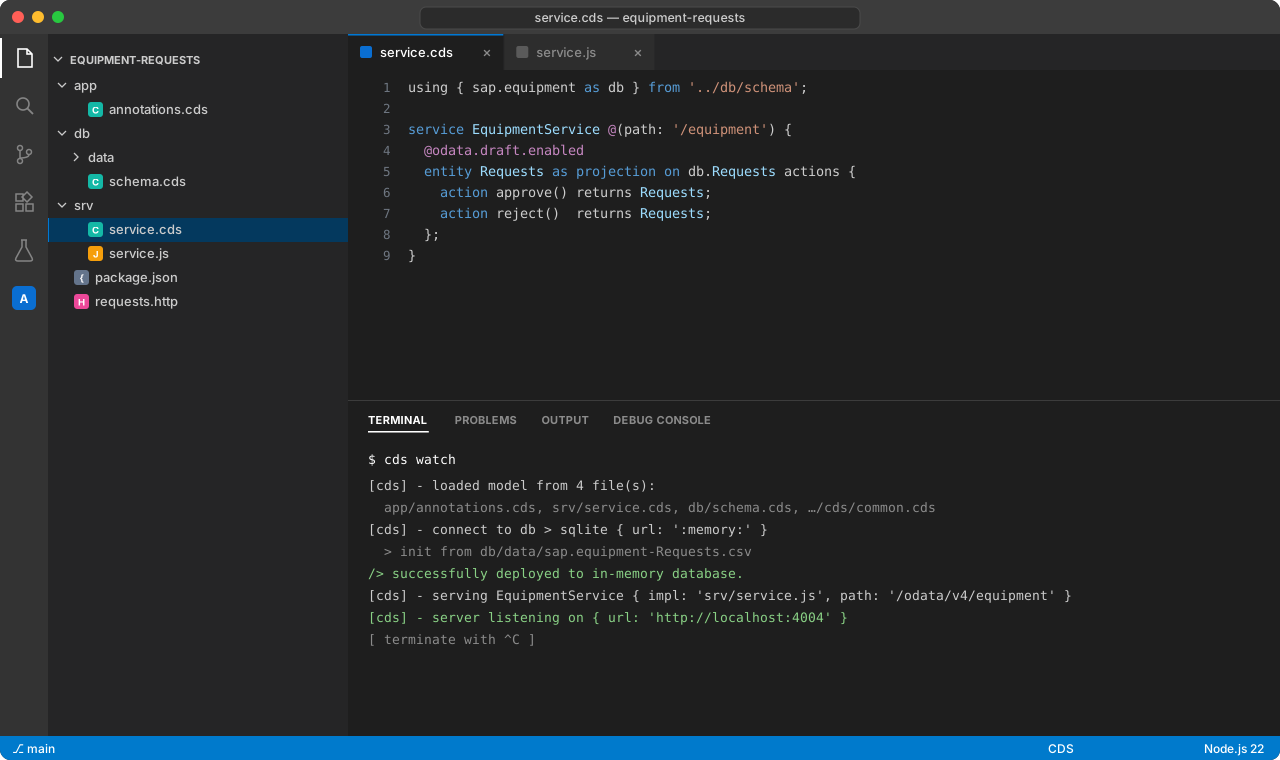
Open http://localhost:4004. The welcome page lists the service endpoints and a Fiori preview link.
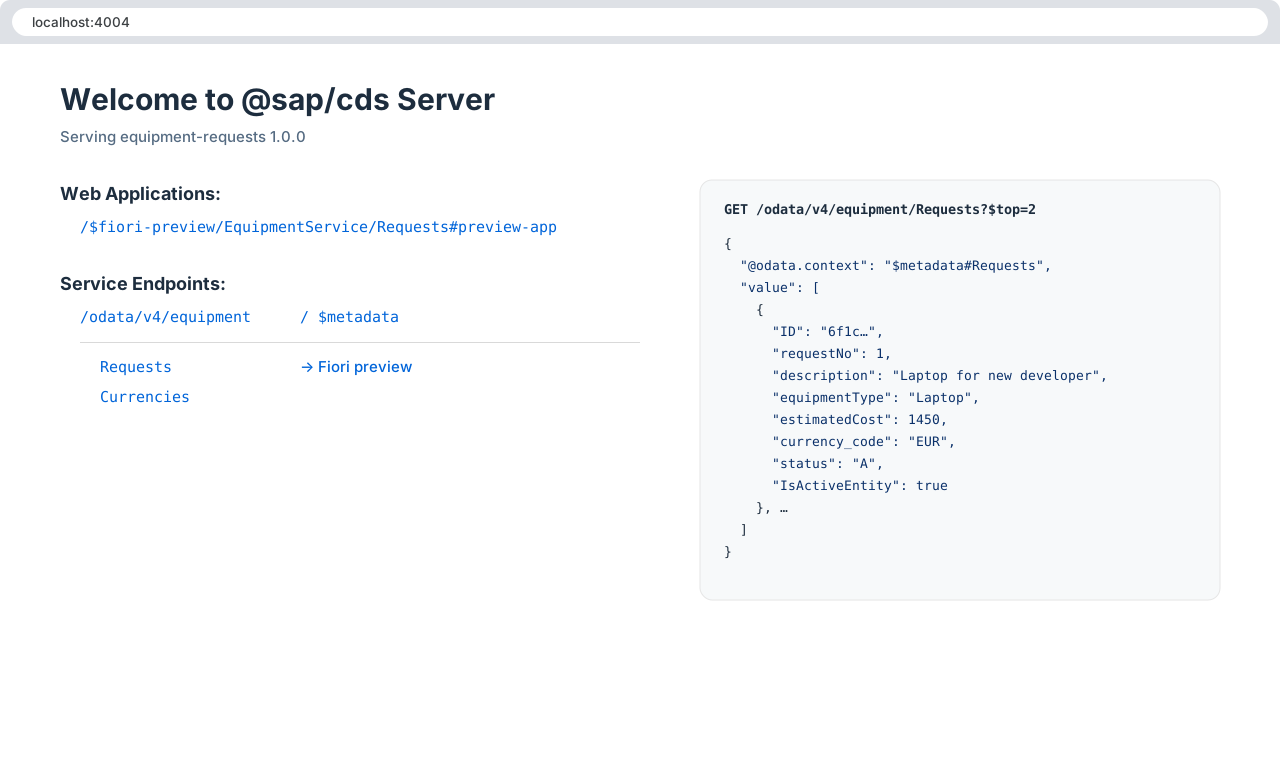
To test without a UI, an .http file works great with the REST Client extension:
### List requests
GET http://localhost:4004/odata/v4/equipment/Requests?$filter=IsActiveEntity eq true

### Create a draft
POST http://localhost:4004/odata/v4/equipment/Requests
Content-Type: application/json

{ "description": "Second monitor", "equipmentType": "Monitor", "estimatedCost": 289.90, "currency_code": "EUR" }

### Activate the draft (replace <ID>)
POST http://localhost:4004/odata/v4/equipment/Requests(ID=<ID>,IsActiveEntity=false)/EquipmentService.draftActivate
Content-Type: application/json

{}

### Approve (replace <ID>)
POST http://localhost:4004/odata/v4/equipment/Requests(ID=<ID>,IsActiveEntity=true)/EquipmentService.approve
Content-Type: application/json

{}6. Fiori Elements annotations
Like the metadata extension in RAP, UI annotations live in a separate file, app/annotations.cds:
using EquipmentService as service from '../srv/service';

annotate service.Requests with @(
  UI.HeaderInfo      : {
    TypeName       : 'Equipment Request',
    TypeNamePlural : 'Equipment Requests',
    Title          : { Value: description },
    Description    : { Value: requestNo }
  },
  UI.SelectionFields : [ requestNo, equipmentType, status ],
  UI.LineItem        : [
    { Value: requestNo,     Label: 'Request No.' },
    { Value: description,   Label: 'Description' },
    { Value: equipmentType, Label: 'Equipment Type' },
    { Value: estimatedCost, Label: 'Estimated Cost' },
    { Value: status,        Label: 'Status' },
    { $Type: 'UI.DataFieldForAction', Action: 'EquipmentService.approve', Label: 'Approve' },
    { $Type: 'UI.DataFieldForAction', Action: 'EquipmentService.reject',  Label: 'Reject' }
  ],
  UI.Facets          : [{
    $Type  : 'UI.ReferenceFacet',
    Label  : 'General Information',
    Target : '@UI.FieldGroup#General'
  }],
  UI.FieldGroup #General : { Data: [
    { Value: description },
    { Value: equipmentType },
    { Value: estimatedCost },
    { Value: currency_code },
    { Value: status }
  ]}
);
Refresh the Fiori preview: list report, object page, draft and the Approve/Reject buttons are all there.
7. Deploy to BTP
For production, CAP adds SAP HANA Cloud, XSUAA authentication, an approuter and an MTA descriptor with one command:
# production building blocks: SAP HANA Cloud, XSUAA, approuter, MTA descriptor
cds add hana,xsuaa,approuter,mta

# build the multi-target archive and deploy it to Cloud Foundry
npm install
mbt build
cf login -a https://api.cf.eu10.hana.ondemand.com
cf deploy mta_archives/equipment-requests_1.0.0.mtar
After the deployment, assign the role collections in the BTP cockpit and add the app to the launchpad (SAP Build Work Zone).
What to take away
- CAP gets you from an empty folder to a working OData V4 service with draft in minutes.
- The concepts map one-to-one to RAP: entities ↔ view entities, handlers ↔ behavior implementation, annotations ↔ metadata extensions.
- Choose by where the logic belongs: inside S/4HANA → RAP, side-by-side on BTP → CAP.
Comments