SAP CAP ile İlk Servis: 30 Dakikada Sıfırdan Fiori'ye
RAP yazısındaki ekipman talebi uygulamasını bu kez SAP Cloud Application Programming Model (CAP), Node.js ve OData V4 ile kuruyor, ardından BTP'ye deploy ediyoruz.
RAP yazısında ABAP tarafında bir Ekipman Talebi uygulaması geliştirmiştik. Burada aynı uygulamayı SAP'nin Cloud Application Programming Model'i, yani CAP ile Node.js üzerinde kuruyoruz. Aynı iş, farklı çalışma ortamı: hangi modelin nerede öne çıktığını görmenin iyi bir yolu.
RAP mı, CAP mi?
| RAP | CAP | |
|---|---|---|
| Çalıştığı yer | ABAP (S/4HANA, BTP ABAP ortamı) | Node.js veya Java (BTP Cloud Foundry / Kyma) |
| Veri modeli | CDS view entity + DDIC tabloları | CDS entity'leri (veritabanı otomatik üretilir) |
| İş mantığı | ABAP behavior pool, EML | JavaScript/Java event handler'ları |
| Tipik kullanım | S/4 verisine yakın uzantılar | Yan yana (side-by-side) uygulamalar, yeni ürünler, çok sistemli senaryolar |
Hiçbiri diğerinden "daha iyi" değil: İş mantığı S/4HANA'nın içine aitse RAP doğal seçim; BTP üzerinde yan yana bir uzantıysa CAP daha uygun.
1. Projeyi kurmak
Node.js (LTS) ve CAP araçları gerekiyor. VS Code da SAP Business Application Studio da olur.
# once per machine
npm install -g @sap/cds-dk

# new project
cds init equipment-requests
cd equipment-requests
npm install

# start with live reload (in-memory SQLite + sample data)
cds watch2. Veri modeli
db/schema.cds veriyi tanımlıyor. cuid ve managed aspect'leri bir UUID anahtar ile oluşturma/değiştirme alanlarını ekliyor; RAP'te elle yazdığımız yönetim alanlarının CAP'teki karşılığı.
namespace sap.equipment;

using { cuid, managed, Currency } from '@sap/cds/common';

entity Requests : cuid, managed {
  requestNo     : Integer @readonly;
  description   : String(80) @mandatory;
  equipmentType : String(20) @mandatory;
  estimatedCost : Decimal(15, 2);
  currency      : Currency;
  status        : String(1) default 'O' @readonly enum {
    Open     = 'O';
    Approved = 'A';
    Rejected = 'X';
  };
}
Örnek veri db/data/sap.equipment-Requests.csv dosyasına konuyor; CAP bunu otomatik yüklüyor:
ID;requestNo;description;equipmentType;estimatedCost;currency_code;status
6f1c2a90-1b3e-4c55-9d7a-0e7f5b1a2c01;1;Laptop for new developer;Laptop;1450.00;EUR;A
6f1c2a90-1b3e-4c55-9d7a-0e7f5b1a2c02;2;Ergonomic keyboard;Accessory;89.00;EUR;X
6f1c2a90-1b3e-4c55-9d7a-0e7f5b1a2c03;3;Docking station for meeting room;Docking;320.00;EUR;O3. Servis tanımı
srv/service.cds, bir projection'ı OData V4 servisi olarak dışarı açıyor. @odata.draft.enabled, RAP'teki with draft ile aynı draft davranışını veriyor; iki bound action da doğrudan entity üzerinde tanımlanıyor.
using { sap.equipment as db } from '../db/schema';

service EquipmentService @(path: '/equipment') {
  @odata.draft.enabled
  entity Requests as projection on db.Requests actions {
    action approve() returns Requests;
    action reject()  returns Requests;
  };
}4. İş mantığı
srv/service.js, event handler'ları kaydediyor. Bunlar CAP'te determination, validation ve aksiyon implementasyonlarının karşılığı:
const cds = require('@sap/cds');

module.exports = class EquipmentService extends cds.ApplicationService {
  init() {
    const { Requests } = this.entities;

    // Next request number when a draft is activated (demo: MAX + 1)
    this.before('CREATE', Requests, async (req) => {
      const { max } = await SELECT.one`max(requestNo) as max`.from(Requests);
      req.data.requestNo = (max ?? 0) + 1;
    });

    // Validation – the message is attached to the field in Fiori
    this.before(['CREATE', 'UPDATE'], Requests, (req) => {
      const { estimatedCost } = req.data;
      if (estimatedCost !== undefined && estimatedCost <= 0) {
        req.error(400, 'Estimated cost must be greater than zero', 'estimatedCost');
      }
    });

    this.on('approve', Requests, (req) => this.setStatus(req, 'A'));
    this.on('reject', Requests, (req) => this.setStatus(req, 'X'));

    return super.init();
  }

  async setStatus(req, status) {
    const { Requests } = this.entities;
    const [{ ID }] = req.params;
    const request = await SELECT.one.from(Requests, ID).columns('status');
    if (!request) return req.reject(404, 'Request not found');
    if (request.status !== 'O') return req.reject(409, 'Only open requests can be approved or rejected');

    await UPDATE(Requests, ID).with({ status });
    return SELECT.one.from(Requests, ID);
  }
};before('CREATE')→ kayıtta çalışan determination gibi: sıradaki talep numarasını veriyor.before(['CREATE','UPDATE'])→ validation;req.errormesajı ilgili alana bağlıyor.on('approve')/on('reject')→ durum kontrolüyle aksiyon implementasyonları.
5. Çalıştırmak
Terminalde cds watch çalıştırın. CAP modeli derliyor, bellekte bir SQLite veritabanı oluşturuyor, CSV'yi yüklüyor ve servisi ayağa kaldırıyor; her kayıtta da kendini yeniliyor.
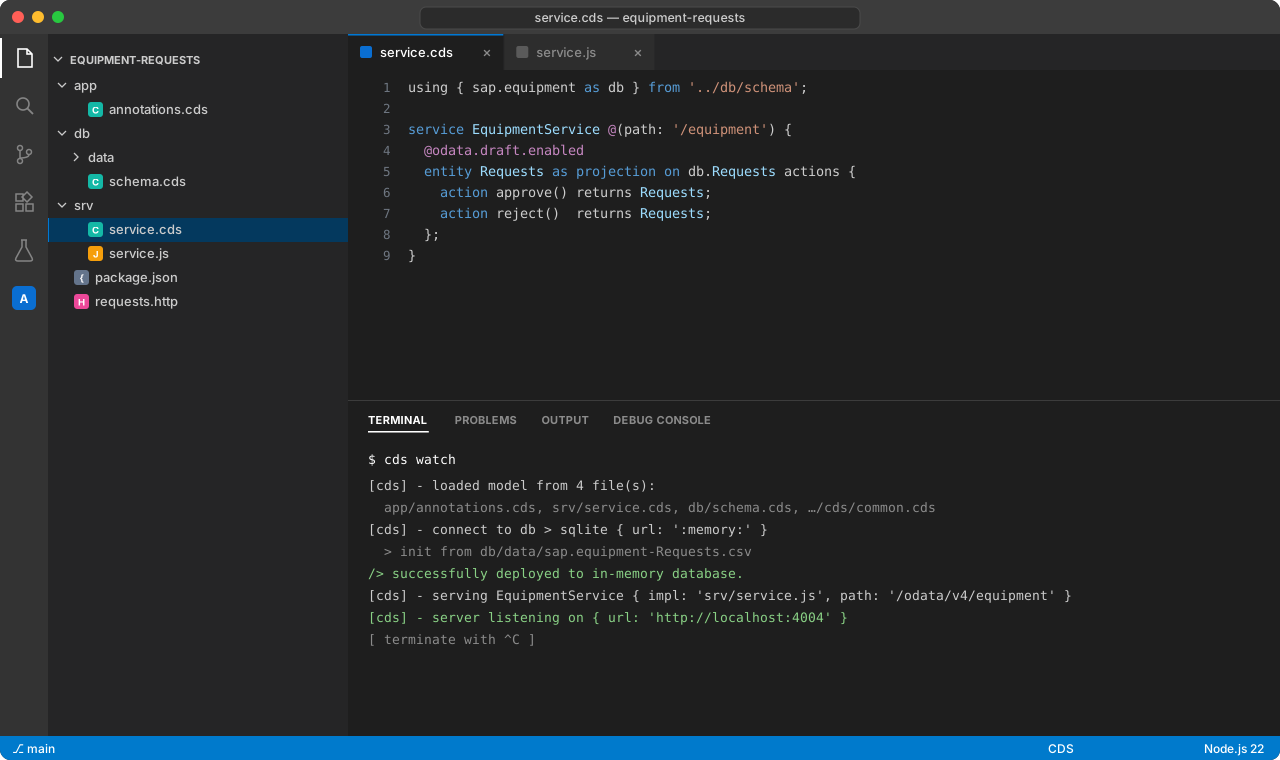
http://localhost:4004 adresini açın. Karşılama sayfasında servis adresleri ve bir Fiori preview bağlantısı var.
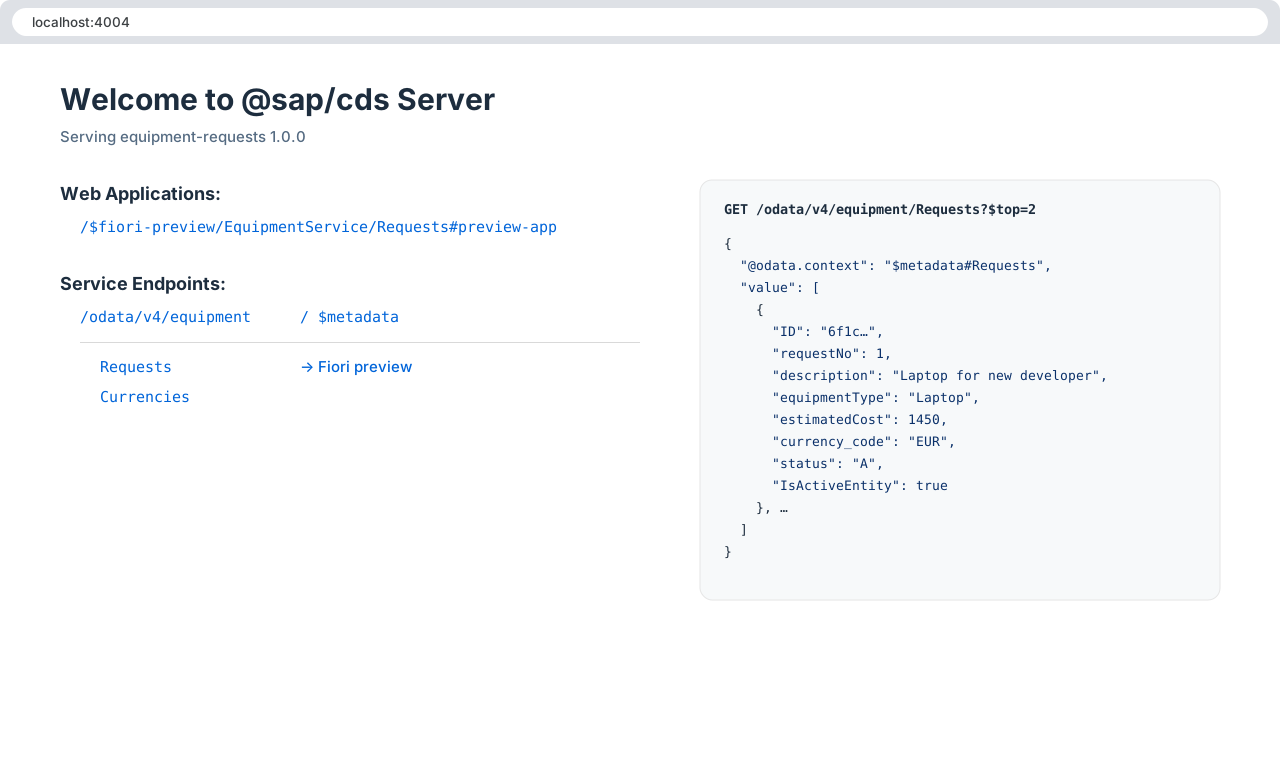
Arayüz olmadan test etmek için REST Client eklentisiyle bir .http dosyası çok pratik:
### List requests
GET http://localhost:4004/odata/v4/equipment/Requests?$filter=IsActiveEntity eq true

### Create a draft
POST http://localhost:4004/odata/v4/equipment/Requests
Content-Type: application/json

{ "description": "Second monitor", "equipmentType": "Monitor", "estimatedCost": 289.90, "currency_code": "EUR" }

### Activate the draft (replace <ID>)
POST http://localhost:4004/odata/v4/equipment/Requests(ID=<ID>,IsActiveEntity=false)/EquipmentService.draftActivate
Content-Type: application/json

{}

### Approve (replace <ID>)
POST http://localhost:4004/odata/v4/equipment/Requests(ID=<ID>,IsActiveEntity=true)/EquipmentService.approve
Content-Type: application/json

{}6. Fiori Elements annotation'ları
RAP'teki metadata extension gibi, UI annotation'ları da ayrı bir dosyada duruyor: app/annotations.cds.
using EquipmentService as service from '../srv/service';

annotate service.Requests with @(
  UI.HeaderInfo      : {
    TypeName       : 'Equipment Request',
    TypeNamePlural : 'Equipment Requests',
    Title          : { Value: description },
    Description    : { Value: requestNo }
  },
  UI.SelectionFields : [ requestNo, equipmentType, status ],
  UI.LineItem        : [
    { Value: requestNo,     Label: 'Request No.' },
    { Value: description,   Label: 'Description' },
    { Value: equipmentType, Label: 'Equipment Type' },
    { Value: estimatedCost, Label: 'Estimated Cost' },
    { Value: status,        Label: 'Status' },
    { $Type: 'UI.DataFieldForAction', Action: 'EquipmentService.approve', Label: 'Approve' },
    { $Type: 'UI.DataFieldForAction', Action: 'EquipmentService.reject',  Label: 'Reject' }
  ],
  UI.Facets          : [{
    $Type  : 'UI.ReferenceFacet',
    Label  : 'General Information',
    Target : '@UI.FieldGroup#General'
  }],
  UI.FieldGroup #General : { Data: [
    { Value: description },
    { Value: equipmentType },
    { Value: estimatedCost },
    { Value: currency_code },
    { Value: status }
  ]}
);
Fiori önizlemesini yenileyin: list report, object page, draft ve Approve/Reject butonları hazır.
7. BTP'ye deploy
Canlı ortam için CAP tek komutla SAP HANA Cloud, XSUAA kimlik doğrulaması, approuter ve MTA tanımını ekliyor:
# production building blocks: SAP HANA Cloud, XSUAA, approuter, MTA descriptor
cds add hana,xsuaa,approuter,mta

# build the multi-target archive and deploy it to Cloud Foundry
npm install
mbt build
cf login -a https://api.cf.eu10.hana.ondemand.com
cf deploy mta_archives/equipment-requests_1.0.0.mtar
Deploy sonrası BTP cockpit'te role collection'ları atayın ve uygulamayı launchpad'e (SAP Build Work Zone) ekleyin.
Akılda kalması gerekenler
- CAP ile boş bir klasörden draft destekli, çalışan bir OData V4 servisine dakikalar içinde ulaşılıyor.
- Kavramlar RAP ile birebir eşleşiyor: entity ↔ view entity, handler ↔ behavior implementation, annotation dosyası ↔ metadata extension.
- Seçimi iş mantığının nereye ait olduğuna göre yapın: S/4HANA'nın içiyse RAP, BTP'de yan yana ise CAP.
Yorumlar