Ihr erster SAP-CAP-Service: In 30 Minuten von null zu Fiori
Wir bauen die Geräteanforderungs-App aus dem RAP-Artikel noch einmal — diesmal mit dem SAP Cloud Application Programming Model (CAP), Node.js und OData V4 — und deployen sie auf die BTP.
Im RAP-Artikel haben wir eine Geräteanforderung auf dem ABAP-Stack gebaut. Hier entsteht dieselbe App mit CAP, dem Cloud Application Programming Model von SAP, auf Node.js. Gleiche Fachlichkeit, andere Laufzeit — ideal, um zu sehen, wo welches Modell glänzt.
RAP oder CAP?
| RAP | CAP | |
|---|---|---|
| Läuft auf | ABAP (S/4HANA, BTP ABAP Environment) | Node.js oder Java (BTP Cloud Foundry / Kyma) |
| Datenmodell | CDS View Entities + DDIC-Tabellen | CDS-Entitäten (Datenbank wird generiert) |
| Logik | ABAP Behavior Pool, EML | Event-Handler in JavaScript/Java |
| Typischer Einsatz | Erweiterungen nah an S/4-Daten | Side-by-Side-Apps, neue Produkte, Mehrsystem-Szenarien |
Keines ist „besser": Gehört die Logik in S/4HANA, ist RAP die natürliche Wahl; für Side-by-Side-Erweiterungen auf der BTP passt CAP.
1. Projekt anlegen
Benötigt werden Node.js (LTS) und die CAP-Tools. VS Code und SAP Business Application Studio funktionieren beide.
# once per machine
npm install -g @sap/cds-dk

# new project
cds init equipment-requests
cd equipment-requests
npm install

# start with live reload (in-memory SQLite + sample data)
cds watch2. Datenmodell
db/schema.cds beschreibt die Daten. Die Aspekte cuid und managed ergänzen einen UUID-Schlüssel und die Anlage-/Änderungsfelder — das CAP-Gegenstück zu den Verwaltungsfeldern, die wir in RAP von Hand geschrieben haben.
namespace sap.equipment;

using { cuid, managed, Currency } from '@sap/cds/common';

entity Requests : cuid, managed {
  requestNo     : Integer @readonly;
  description   : String(80) @mandatory;
  equipmentType : String(20) @mandatory;
  estimatedCost : Decimal(15, 2);
  currency      : Currency;
  status        : String(1) default 'O' @readonly enum {
    Open     = 'O';
    Approved = 'A';
    Rejected = 'X';
  };
}
Beispieldaten liegen in db/data/sap.equipment-Requests.csv; CAP lädt sie automatisch:
ID;requestNo;description;equipmentType;estimatedCost;currency_code;status
6f1c2a90-1b3e-4c55-9d7a-0e7f5b1a2c01;1;Laptop for new developer;Laptop;1450.00;EUR;A
6f1c2a90-1b3e-4c55-9d7a-0e7f5b1a2c02;2;Ergonomic keyboard;Accessory;89.00;EUR;X
6f1c2a90-1b3e-4c55-9d7a-0e7f5b1a2c03;3;Docking station for meeting room;Docking;320.00;EUR;O3. Service-Definition
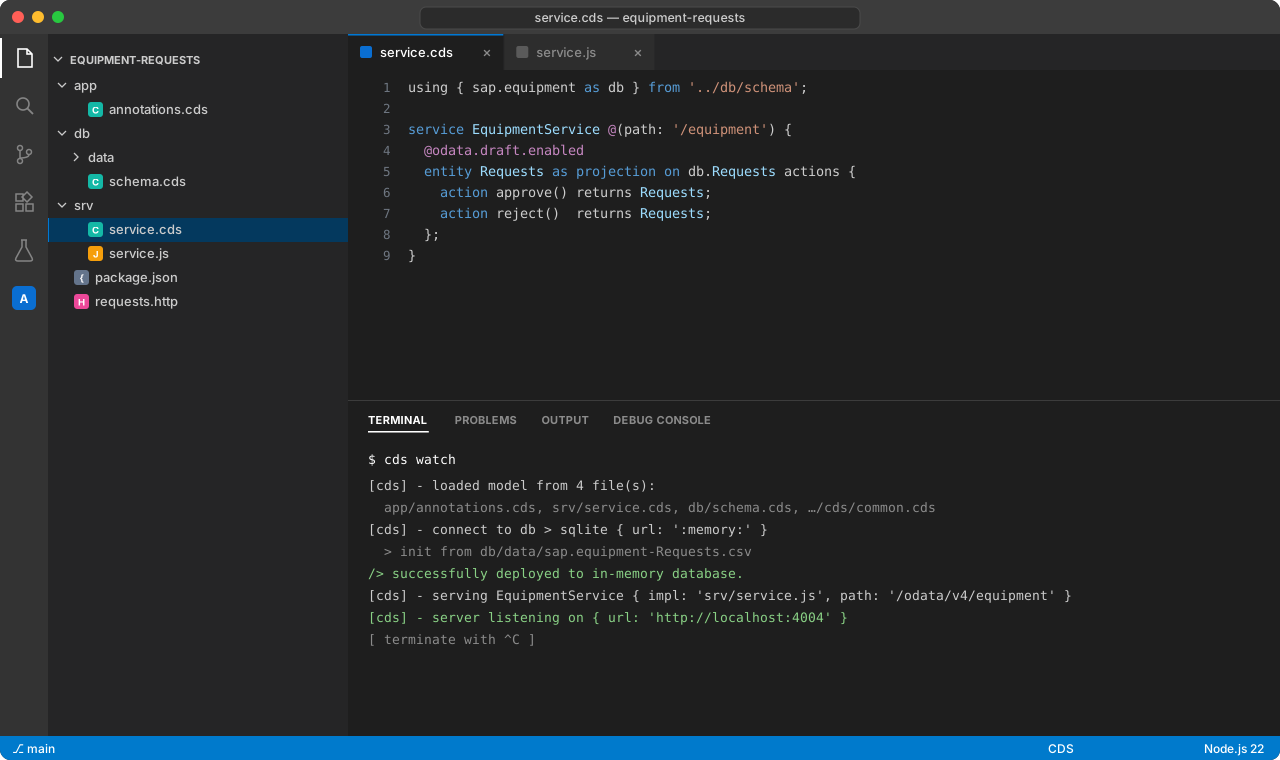
srv/service.cds stellt eine Projektion als OData-V4-Service bereit. @odata.draft.enabled liefert dasselbe Draft-Handling wie with draft in RAP, und die beiden gebundenen Aktionen werden direkt an der Entität deklariert.
using { sap.equipment as db } from '../db/schema';

service EquipmentService @(path: '/equipment') {
  @odata.draft.enabled
  entity Requests as projection on db.Requests actions {
    action approve() returns Requests;
    action reject()  returns Requests;
  };
}4. Eigene Logik
srv/service.js registriert Event-Handler — das CAP-Pendant zu Determinationen, Validierungen und Aktionsimplementierungen:
const cds = require('@sap/cds');

module.exports = class EquipmentService extends cds.ApplicationService {
  init() {
    const { Requests } = this.entities;

    // Next request number when a draft is activated (demo: MAX + 1)
    this.before('CREATE', Requests, async (req) => {
      const { max } = await SELECT.one`max(requestNo) as max`.from(Requests);
      req.data.requestNo = (max ?? 0) + 1;
    });

    // Validation – the message is attached to the field in Fiori
    this.before(['CREATE', 'UPDATE'], Requests, (req) => {
      const { estimatedCost } = req.data;
      if (estimatedCost !== undefined && estimatedCost <= 0) {
        req.error(400, 'Estimated cost must be greater than zero', 'estimatedCost');
      }
    });

    this.on('approve', Requests, (req) => this.setStatus(req, 'A'));
    this.on('reject', Requests, (req) => this.setStatus(req, 'X'));

    return super.init();
  }

  async setStatus(req, status) {
    const { Requests } = this.entities;
    const [{ ID }] = req.params;
    const request = await SELECT.one.from(Requests, ID).columns('status');
    if (!request) return req.reject(404, 'Request not found');
    if (request.status !== 'O') return req.reject(409, 'Only open requests can be approved or rejected');

    await UPDATE(Requests, ID).with({ status });
    return SELECT.one.from(Requests, ID);
  }
};before('CREATE')→ wie eine Determination beim Sichern: vergibt die nächste Anforderungsnummer.before(['CREATE','UPDATE'])→ Validierung;req.errorhängt die Meldung an das Feld.on('approve')/on('reject')→ Aktionsimplementierungen mit Statusprüfung.
5. Starten
cds watch im Terminal ausführen. CAP kompiliert das Modell, legt eine In-Memory-SQLite-Datenbank an, lädt die CSV und startet den Service — und lädt bei jedem Speichern neu.
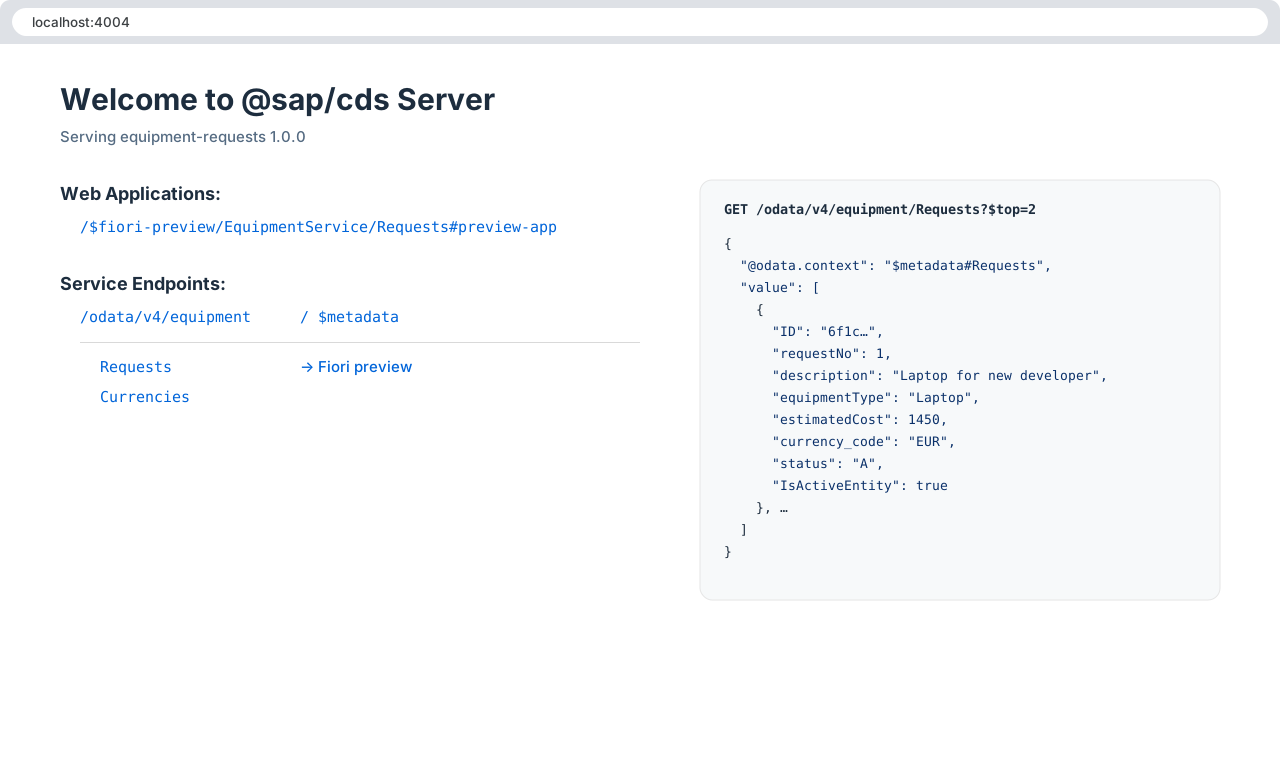
http://localhost:4004 öffnen. Die Startseite zeigt die Service-Endpunkte und einen Link zur Fiori-Vorschau.
Zum Testen ohne Oberfläche eignet sich eine .http-Datei mit der Erweiterung REST Client:
### List requests
GET http://localhost:4004/odata/v4/equipment/Requests?$filter=IsActiveEntity eq true

### Create a draft
POST http://localhost:4004/odata/v4/equipment/Requests
Content-Type: application/json

{ "description": "Second monitor", "equipmentType": "Monitor", "estimatedCost": 289.90, "currency_code": "EUR" }

### Activate the draft (replace <ID>)
POST http://localhost:4004/odata/v4/equipment/Requests(ID=<ID>,IsActiveEntity=false)/EquipmentService.draftActivate
Content-Type: application/json

{}

### Approve (replace <ID>)
POST http://localhost:4004/odata/v4/equipment/Requests(ID=<ID>,IsActiveEntity=true)/EquipmentService.approve
Content-Type: application/json

{}6. Fiori-Elements-Annotationen
Wie die Metadata Extension in RAP liegen die UI-Annotationen in einer eigenen Datei, app/annotations.cds:
using EquipmentService as service from '../srv/service';

annotate service.Requests with @(
  UI.HeaderInfo      : {
    TypeName       : 'Equipment Request',
    TypeNamePlural : 'Equipment Requests',
    Title          : { Value: description },
    Description    : { Value: requestNo }
  },
  UI.SelectionFields : [ requestNo, equipmentType, status ],
  UI.LineItem        : [
    { Value: requestNo,     Label: 'Request No.' },
    { Value: description,   Label: 'Description' },
    { Value: equipmentType, Label: 'Equipment Type' },
    { Value: estimatedCost, Label: 'Estimated Cost' },
    { Value: status,        Label: 'Status' },
    { $Type: 'UI.DataFieldForAction', Action: 'EquipmentService.approve', Label: 'Approve' },
    { $Type: 'UI.DataFieldForAction', Action: 'EquipmentService.reject',  Label: 'Reject' }
  ],
  UI.Facets          : [{
    $Type  : 'UI.ReferenceFacet',
    Label  : 'General Information',
    Target : '@UI.FieldGroup#General'
  }],
  UI.FieldGroup #General : { Data: [
    { Value: description },
    { Value: equipmentType },
    { Value: estimatedCost },
    { Value: currency_code },
    { Value: status }
  ]}
);
Fiori-Vorschau neu laden: List Report, Object Page, Draft und die Buttons Approve/Reject sind da.
7. Deployment auf die BTP
Für die Produktion fügt CAP mit einem Befehl SAP HANA Cloud, XSUAA-Authentifizierung, einen Approuter und einen MTA-Deskriptor hinzu:
# production building blocks: SAP HANA Cloud, XSUAA, approuter, MTA descriptor
cds add hana,xsuaa,approuter,mta

# build the multi-target archive and deploy it to Cloud Foundry
npm install
mbt build
cf login -a https://api.cf.eu10.hana.ondemand.com
cf deploy mta_archives/equipment-requests_1.0.0.mtar
Nach dem Deployment im BTP Cockpit die Role Collections zuweisen und die App ins Launchpad (SAP Build Work Zone) aufnehmen.
Das Wichtigste
- Mit CAP kommt man in Minuten von einem leeren Ordner zu einem OData-V4-Service mit Draft.
- Die Konzepte entsprechen RAP: Entitäten ↔ View Entities, Handler ↔ Behavior Implementation, Annotationsdatei ↔ Metadata Extension.
- Entscheiden Sie danach, wo die Logik hingehört: in S/4HANA → RAP, side-by-side auf der BTP → CAP.
Kommentare