Building a Managed RAP Service with Draft, Step by Step
From a database table to a working Fiori Elements app — a complete managed RAP business object with draft, validation, determinations and approve/reject actions.
In this post we build a small but complete RAP (ABAP RESTful Application Programming Model) application: an Equipment Request app where employees request a laptop or a monitor and a manager approves or rejects it.
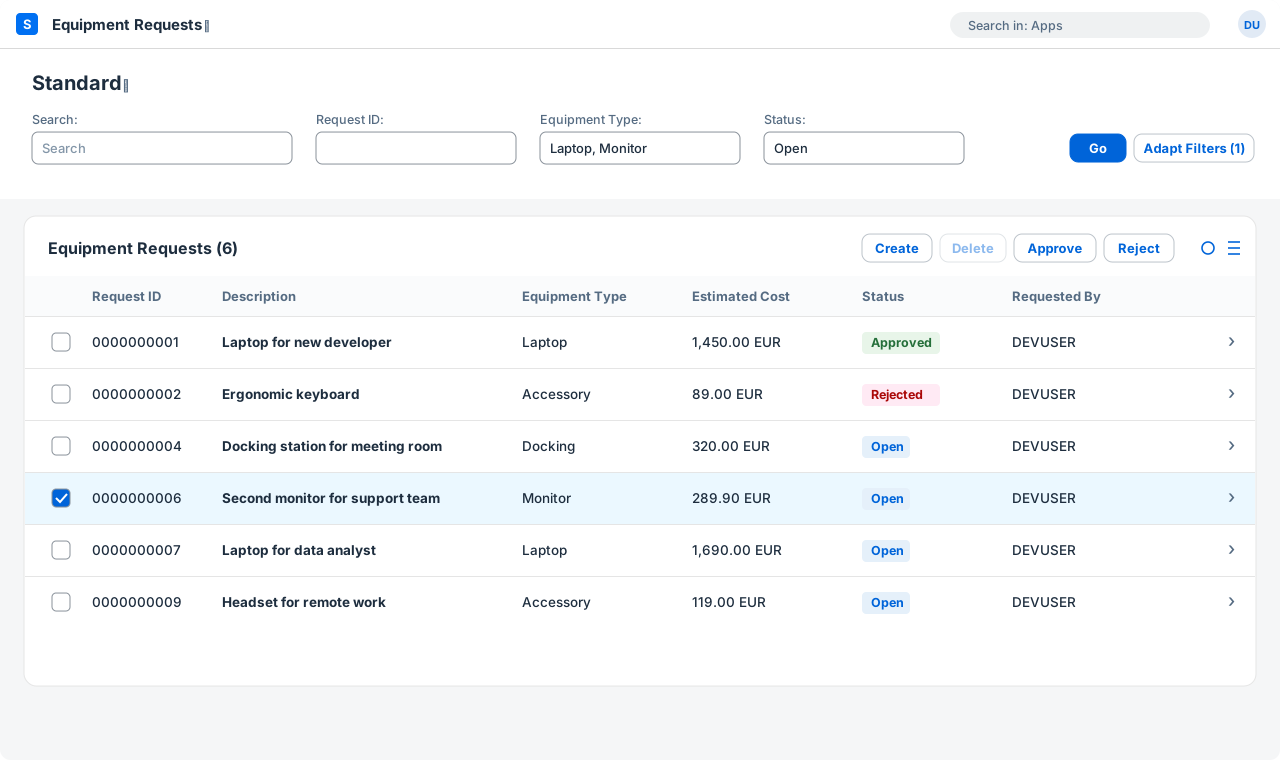
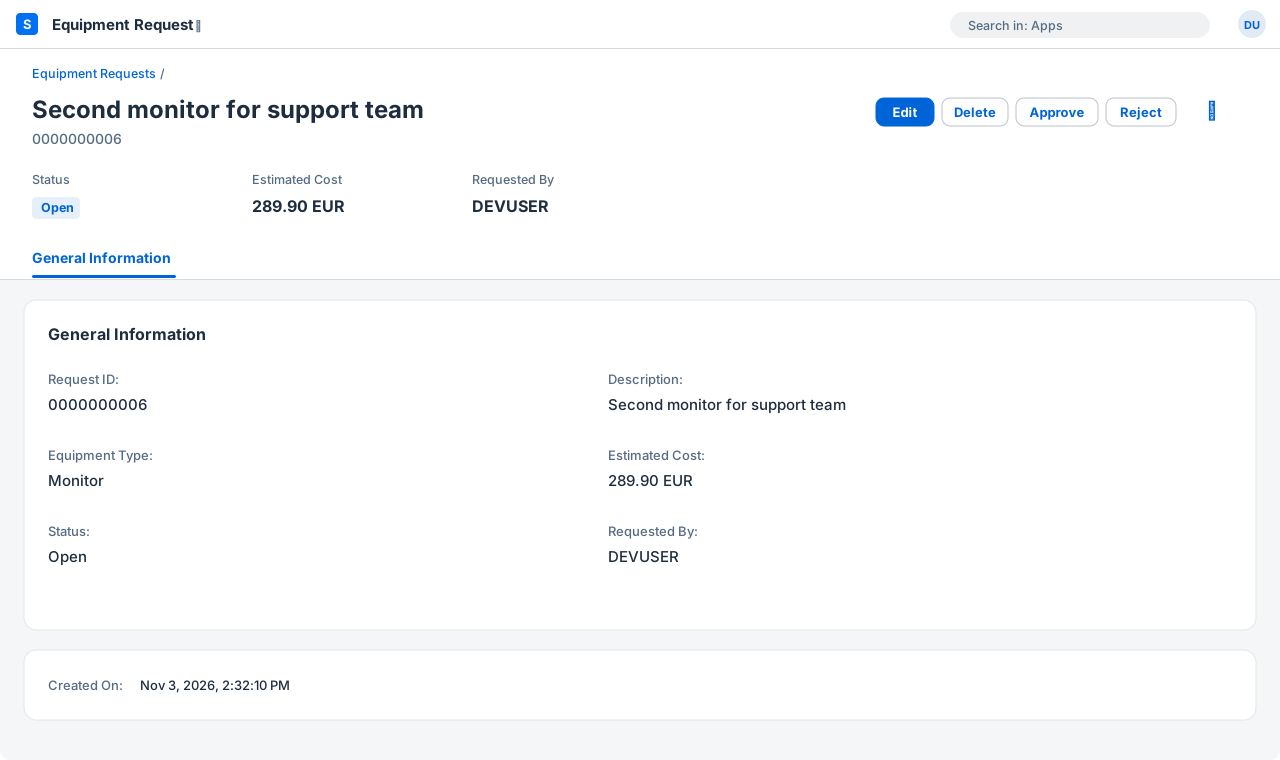
At the end you will have a list report + object page in Fiori Elements, with draft handling, a validation, two determinations and two actions. No UI5 code at all.
Prerequisites: S/4HANA 2022 or later (on-premise or private cloud) or the SAP BTP ABAP environment, and ABAP Development Tools (Eclipse or VS Code). Everything here uses ABAP for Cloud Development and only released APIs.
The objects we will create
| Object | Type | Purpose |
|---|---|---|
ZEQUIP_REQ |
Database table | Persistent data |
ZR_EquipmentRequest |
CDS root view entity | Base business object |
ZR_EquipmentRequest |
Behavior definition | Transactional behavior + draft |
ZBP_R_EquipmentRequest |
Class | Behavior implementation |
ZC_EquipmentRequest |
CDS projection + behavior | Service-specific view |
ZC_EquipmentRequest |
Metadata extension | UI annotations |
ZUI_EQUIPMENTREQUEST |
Service definition | What to expose |
ZUI_EQUIPMENTREQUEST_O4 |
Service binding | OData V4 – UI |
The naming follows a simple rule: ZR_ for the root business object, ZC_ for projections, ZBP_ for behavior pools and ZUI_ for UI services.
1. Database table
The key is a UUID (sysuuid_x16), which lets RAP assign keys automatically (managed numbering). The human-readable number request_id is filled separately when the request is saved.
The last five fields are administrative fields. Their abp_* data elements together with the @Semantics annotations in the next step let the framework fill them for you — and they are needed for ETag and draft handling.
@EndUserText.label : 'Equipment Request'
@AbapCatalog.enhancement.category : #NOT_EXTENSIBLE
@AbapCatalog.tableCategory : #TRANSPARENT
@AbapCatalog.deliveryClass : #A
@AbapCatalog.dataMaintenance : #RESTRICTED
define table zequip_req {
  key client            : abap.clnt not null;
  key request_uuid      : sysuuid_x16 not null;
  request_id            : abap.numc(10);
  description           : abap.char(80);
  equipment_type        : abap.char(20);
  @Semantics.amount.currencyCode : 'zequip_req.currency_code'
  estimated_cost        : abap.curr(15,2);
  currency_code         : abap.cuky;
  status                : abap.char(1);
  requested_by          : abp_creation_user;
  created_at            : abp_creation_tstmpl;
  local_last_changed_by : abp_locinst_lastchange_user;
  local_last_changed_at : abp_locinst_lastchange_tstmpl;
  last_changed_at       : abp_lastchange_tstmpl;
}2. Root CDS view entity
The root view gives the table nicer, CamelCase element names and marks the administrative fields with @Semantics annotations.
@AccessControl.authorizationCheck: #NOT_REQUIRED
@EndUserText.label: 'Equipment Request - Root'
define root view entity ZR_EquipmentRequest
  as select from zequip_req
{
  key request_uuid          as RequestUUID,
      request_id            as RequestID,
      description           as Description,
      equipment_type        as EquipmentType,
      @Semantics.amount.currencyCode: 'CurrencyCode'
      estimated_cost        as EstimatedCost,
      currency_code         as CurrencyCode,
      status                as Status,
      @Semantics.user.createdBy: true
      requested_by          as RequestedBy,
      @Semantics.systemDateTime.createdAt: true
      created_at            as CreatedAt,
      @Semantics.user.localInstanceLastChangedBy: true
      local_last_changed_by as LocalLastChangedBy,
      @Semantics.systemDateTime.localInstanceLastChangedAt: true
      local_last_changed_at as LocalLastChangedAt,
      @Semantics.systemDateTime.lastChangedAt: true
      last_changed_at       as LastChangedAt
}3. Behavior definition
This is the heart of the business object. Right-click the root view → New Behavior Definition, then adapt it:
managed implementation in class zbp_r_equipmentrequest unique;
strict ( 2 );
with draft;

define behavior for ZR_EquipmentRequest alias EquipmentRequest
persistent table zequip_req
draft table zequip_req_d
etag master LocalLastChangedAt
lock master total etag LastChangedAt
authorization master ( global )
{
  field ( numbering : managed, readonly ) RequestUUID;
  field ( readonly ) RequestID, Status, RequestedBy, CreatedAt,
                     LocalLastChangedBy, LocalLastChangedAt, LastChangedAt;
  field ( mandatory ) Description, EquipmentType;

  create;
  update;
  delete;

  action ( features : instance ) approve result [1] $self;
  action ( features : instance ) reject result [1] $self;

  determination setInitialValues on modify { create; }
  determination setRequestID on save { create; }
  validation validateCost on save { create; field EstimatedCost, CurrencyCode; }

  draft action Activate optimized;
  draft action Discard;
  draft action Edit;
  draft action Resume;
  draft determine action Prepare { validation validateCost; }

  mapping for zequip_req
  {
    RequestUUID        = request_uuid;
    RequestID          = request_id;
    Description        = description;
    EquipmentType      = equipment_type;
    EstimatedCost      = estimated_cost;
    CurrencyCode       = currency_code;
    Status             = status;
    RequestedBy        = requested_by;
    CreatedAt          = created_at;
    LocalLastChangedBy = local_last_changed_by;
    LocalLastChangedAt = local_last_changed_at;
    LastChangedAt      = last_changed_at;
  }
}
A few things worth noting:
strict ( 2 )enables the latest strict mode checks — always use it for new development.with draft+draft table zequip_req_d: the draft table does not exist yet. Put the cursor on its name and use the quick fix (Ctrl+1) to generate it.etag masterprotects against lost updates;total etagis required for draft.features : instanceon the actions means we decide per record whether the buttons are enabled.draft determine action Prepareruns the validation already while the user is still in draft, so errors appear before Save.
4. Behavior implementation
Use the quick fix on the class name in the first line to create ZBP_R_EquipmentRequest. The global class stays empty:
CLASS zbp_r_equipmentrequest DEFINITION PUBLIC ABSTRACT FINAL
  FOR BEHAVIOR OF zr_equipmentrequest.
ENDCLASS.

CLASS zbp_r_equipmentrequest IMPLEMENTATION.
ENDCLASS.
All the logic lives in the Local Types tab of the class:
" Local types (tab "Local Types" in ADT)
CLASS lhc_equipmentrequest DEFINITION INHERITING FROM cl_abap_behavior_handler.
  PRIVATE SECTION.
    CONSTANTS:
      BEGIN OF c_status,
        open     TYPE c LENGTH 1 VALUE 'O',
        approved TYPE c LENGTH 1 VALUE 'A',
        rejected TYPE c LENGTH 1 VALUE 'X',
      END OF c_status.

    METHODS get_global_authorizations FOR GLOBAL AUTHORIZATION
      IMPORTING REQUEST requested_authorizations FOR EquipmentRequest RESULT result.

    METHODS get_instance_features FOR INSTANCE FEATURES
      IMPORTING keys REQUEST requested_features FOR EquipmentRequest RESULT result.

    METHODS approve FOR MODIFY
      IMPORTING keys FOR ACTION EquipmentRequest~approve RESULT result.

    METHODS reject FOR MODIFY
      IMPORTING keys FOR ACTION EquipmentRequest~reject RESULT result.

    METHODS setinitialvalues FOR DETERMINE ON MODIFY
      IMPORTING keys FOR EquipmentRequest~setInitialValues.

    METHODS setrequestid FOR DETERMINE ON SAVE
      IMPORTING keys FOR EquipmentRequest~setRequestID.

    METHODS validatecost FOR VALIDATE ON SAVE
      IMPORTING keys FOR EquipmentRequest~validateCost.
ENDCLASS.

CLASS lhc_equipmentrequest IMPLEMENTATION.

  METHOD get_global_authorizations.
    " Demo: everyone may create/change/delete.
    " In a real app check an authorization object here (AUTHORITY-CHECK).
    result = VALUE #( %create = if_abap_behv=>auth-allowed
                      %update = if_abap_behv=>auth-allowed
                      %delete = if_abap_behv=>auth-allowed ).
  ENDMETHOD.

  METHOD get_instance_features.
    READ ENTITIES OF zr_equipmentrequest IN LOCAL MODE
      ENTITY EquipmentRequest
        FIELDS ( Status ) WITH CORRESPONDING #( keys )
      RESULT DATA(requests).

    " Approve / reject only while the request is still open
    result = VALUE #( FOR req IN requests
                      LET enabled = COND #( WHEN req-Status = c_status-open
                                            THEN if_abap_behv=>fc-o-enabled
                                            ELSE if_abap_behv=>fc-o-disabled )
                      IN ( %tky            = req-%tky
                           %action-approve = enabled
                           %action-reject  = enabled ) ).
  ENDMETHOD.

  METHOD approve.
    MODIFY ENTITIES OF zr_equipmentrequest IN LOCAL MODE
      ENTITY EquipmentRequest
        UPDATE FIELDS ( Status )
        WITH VALUE #( FOR key IN keys ( %tky = key-%tky Status = c_status-approved ) ).

    READ ENTITIES OF zr_equipmentrequest IN LOCAL MODE
      ENTITY EquipmentRequest
        ALL FIELDS WITH CORRESPONDING #( keys )
      RESULT DATA(requests).

    result = VALUE #( FOR req IN requests ( %tky = req-%tky %param = req ) ).
  ENDMETHOD.

  METHOD reject.
    MODIFY ENTITIES OF zr_equipmentrequest IN LOCAL MODE
      ENTITY EquipmentRequest
        UPDATE FIELDS ( Status )
        WITH VALUE #( FOR key IN keys ( %tky = key-%tky Status = c_status-rejected ) ).

    READ ENTITIES OF zr_equipmentrequest IN LOCAL MODE
      ENTITY EquipmentRequest
        ALL FIELDS WITH CORRESPONDING #( keys )
      RESULT DATA(requests).

    result = VALUE #( FOR req IN requests ( %tky = req-%tky %param = req ) ).
  ENDMETHOD.

  METHOD setinitialvalues.
    READ ENTITIES OF zr_equipmentrequest IN LOCAL MODE
      ENTITY EquipmentRequest
        FIELDS ( Status CurrencyCode ) WITH CORRESPONDING #( keys )
      RESULT DATA(requests).

    DELETE requests WHERE Status IS NOT INITIAL.
    CHECK requests IS NOT INITIAL.

    MODIFY ENTITIES OF zr_equipmentrequest IN LOCAL MODE
      ENTITY EquipmentRequest
        UPDATE FIELDS ( Status CurrencyCode )
        WITH VALUE #( FOR req IN requests
                      ( %tky         = req-%tky
                        Status       = c_status-open
                        CurrencyCode = COND #( WHEN req-CurrencyCode IS INITIAL
                                               THEN 'EUR'
                                               ELSE req-CurrencyCode ) ) ).
  ENDMETHOD.

  METHOD setrequestid.
    READ ENTITIES OF zr_equipmentrequest IN LOCAL MODE
      ENTITY EquipmentRequest
        FIELDS ( RequestID ) WITH CORRESPONDING #( keys )
      RESULT DATA(requests).

    DELETE requests WHERE RequestID IS NOT INITIAL.
    CHECK requests IS NOT INITIAL.

    " Demo only: MAX + 1. Use a number range object in production.
    SELECT SINGLE FROM zequip_req
      FIELDS MAX( request_id )
      INTO @DATA(max_id).

    MODIFY ENTITIES OF zr_equipmentrequest IN LOCAL MODE
      ENTITY EquipmentRequest
        UPDATE FIELDS ( RequestID )
        WITH VALUE #( FOR req IN requests INDEX INTO i
                      ( %tky = req-%tky RequestID = max_id + i ) ).
  ENDMETHOD.

  METHOD validatecost.
    READ ENTITIES OF zr_equipmentrequest IN LOCAL MODE
      ENTITY EquipmentRequest
        FIELDS ( EstimatedCost CurrencyCode ) WITH CORRESPONDING #( keys )
      RESULT DATA(requests).

    LOOP AT requests INTO DATA(req).
      " Clear old messages of this validation (draft state messages)
      APPEND VALUE #( %tky = req-%tky %state_area = 'VALIDATE_COST' )
        TO reported-equipmentrequest.

      IF req-EstimatedCost <= 0.
        APPEND VALUE #( %tky = req-%tky ) TO failed-equipmentrequest.
        APPEND VALUE #( %tky                   = req-%tky
                        %state_area            = 'VALIDATE_COST'
                        %msg                   = new_message_with_text(
                                                   severity = if_abap_behv_message=>severity-error
                                                   text     = 'Estimated cost must be greater than zero' )
                        %element-EstimatedCost = if_abap_behv=>mk-on )
          TO reported-equipmentrequest.
      ENDIF.
    ENDLOOP.
  ENDMETHOD.

ENDCLASS.
What each method does:
get_instance_features– Approve and Reject are only enabled while the status is Open.approve/reject– update the status with EML (MODIFY ENTITIES ... IN LOCAL MODE) and return the changed record, so the UI refreshes immediately.setinitialvalues– runs on create; sets the status to Open and a default currency.setrequestid– runs on save; assigns the next number. MAX + 1 is fine for a demo, but use a number range object in production.validatecost– rejects zero or negative costs and attaches the message to theEstimatedCostfield.
IN LOCAL MODEskips authorization and feature control checks. That is why we can changeStatuseven though it is read-only for the user.
5. Projection layer
The projection decides what a specific service sees. provider contract transactional_query is mandatory for transactional projections.
@AccessControl.authorizationCheck: #NOT_REQUIRED
@EndUserText.label: 'Equipment Request - Projection'
@Metadata.allowExtensions: true
@Search.searchable: true
define root view entity ZC_EquipmentRequest
  provider contract transactional_query
  as projection on ZR_EquipmentRequest
{
  key RequestUUID,
      @Search.defaultSearchElement: true
      RequestID,
      @Search.defaultSearchElement: true
      @Search.fuzzinessThreshold: 0.8
      Description,
      EquipmentType,
      EstimatedCost,
      @Consumption.valueHelpDefinition: [{ entity: { name: 'I_CurrencyStdVH', element: 'Currency' } }]
      CurrencyCode,
      Status,
      RequestedBy,
      CreatedAt,
      LocalLastChangedAt,
      LastChangedAt
}
The projection behavior simply re-uses what the base BO offers:
projection;
strict ( 2 );
use draft;

define behavior for ZC_EquipmentRequest alias EquipmentRequest
use etag
{
  use create;
  use update;
  use delete;

  use action approve;
  use action reject;

  use action Activate;
  use action Discard;
  use action Edit;
  use action Resume;
  use action Prepare;
}6. UI annotations in a metadata extension
Keep UI annotations out of the CDS view and put them into a metadata extension. The view stays clean, and the UI layer can be changed without touching the data model.
@Metadata.layer: #CUSTOMER
@UI.headerInfo: { typeName: 'Equipment Request',
                  typeNamePlural: 'Equipment Requests',
                  title: { type: #STANDARD, value: 'Description' },
                  description: { value: 'RequestID' } }
annotate entity ZC_EquipmentRequest with
{
  @UI.facet: [{ id: 'General', purpose: #STANDARD, type: #IDENTIFICATION_REFERENCE,
                label: 'General Information', position: 10 }]
  @UI.hidden: true
  RequestUUID;

  @UI: { lineItem: [{ position: 10 }], identification: [{ position: 10 }],
         selectionField: [{ position: 10 }] }
  RequestID;

  @UI: { lineItem: [{ position: 20 }], identification: [{ position: 20 }] }
  Description;

  @UI: { lineItem: [{ position: 30 }], identification: [{ position: 30 }],
         selectionField: [{ position: 20 }] }
  EquipmentType;

  @UI: { lineItem: [{ position: 40 }], identification: [{ position: 40 }] }
  EstimatedCost;

  @UI: { lineItem: [{ position: 50 },
                    { type: #FOR_ACTION, dataAction: 'approve', label: 'Approve' },
                    { type: #FOR_ACTION, dataAction: 'reject',  label: 'Reject' }],
         identification: [{ position: 50 },
                          { type: #FOR_ACTION, dataAction: 'approve', label: 'Approve' },
                          { type: #FOR_ACTION, dataAction: 'reject',  label: 'Reject' }],
         selectionField: [{ position: 30 }] }
  Status;

  @UI: { lineItem: [{ position: 60 }], identification: [{ position: 60 }] }
  RequestedBy;
}7. Service definition and binding
@EndUserText.label: 'Equipment Request - UI Service'
define service ZUI_EQUIPMENTREQUEST {
  expose ZC_EquipmentRequest as EquipmentRequest;
}
Now create a service binding ZUI_EQUIPMENTREQUEST_O4 with binding type OData V4 – UI, activate it and click Publish. Select the EquipmentRequest entity and click Preview — the Fiori Elements app opens in the browser.
8. Try it out
- Click Create. A draft is created and Status is already Open.
- Leave the cost at 0 and press Create again → the validation message appears on the field.
- Enter a cost, save. The request gets its number (
RequestID). - Select the line and click Approve. The status changes and both buttons become disabled.
Where to go next
- Replace MAX + 1 with a number range object.
- Add an access control (DCL) and a real authorization check.
- Move texts into a message class instead of
new_message_with_text. - Write ABAP Unit tests with EML and the RAP test doubles.
- Run ATC with the cloud readiness variant before transporting.
The complete source code is in the code blocks above — copy them in order and activate. Questions or ideas? I'm happy to hear them.
Comments